FM WebSocket 6.0
Description
Minimal setup guide for Internet Live Stream via FMWebsocketManager.
Basic Setup
FM WebSocket 6.0 supports “Room System” with customised room name. All the data are streaming through the self-host node.js server. (server script included in the package)
This package includes example script of a very light-weight node.js server, which you may host it on any Cloud Virtual Machine(linux, windows or mac)
There are two parts in this tutorial setup.
Part A: node.js server
Part B: Unity3D FMWebSocketManager
Part A: Node.js server
Our example server is located in our plugin root folder
/FMWebSocket/TestServer_v6.x.x/Resources/FMWebSocket
- Install npm + node.js Download and install necessary items
https://nodejs.org/en/download/
- Install express https://expressjs.com/en/starter/installing.html
cmd/terminal: npm init
cmd/terminal: Enter…
cmd/terminal: npm install express –save
- Install ws module
cmd/terminal: npm install ws
- Finish & Test on localhost
You may follow this step-by-step tutorial, the commands are compatible in Mac/Windows/Linux https://youtu.be/Zjm5KGHyceU
Part B: Unity3D FMWebSocketManager Setup
Setup for Sender Scene(Sender)
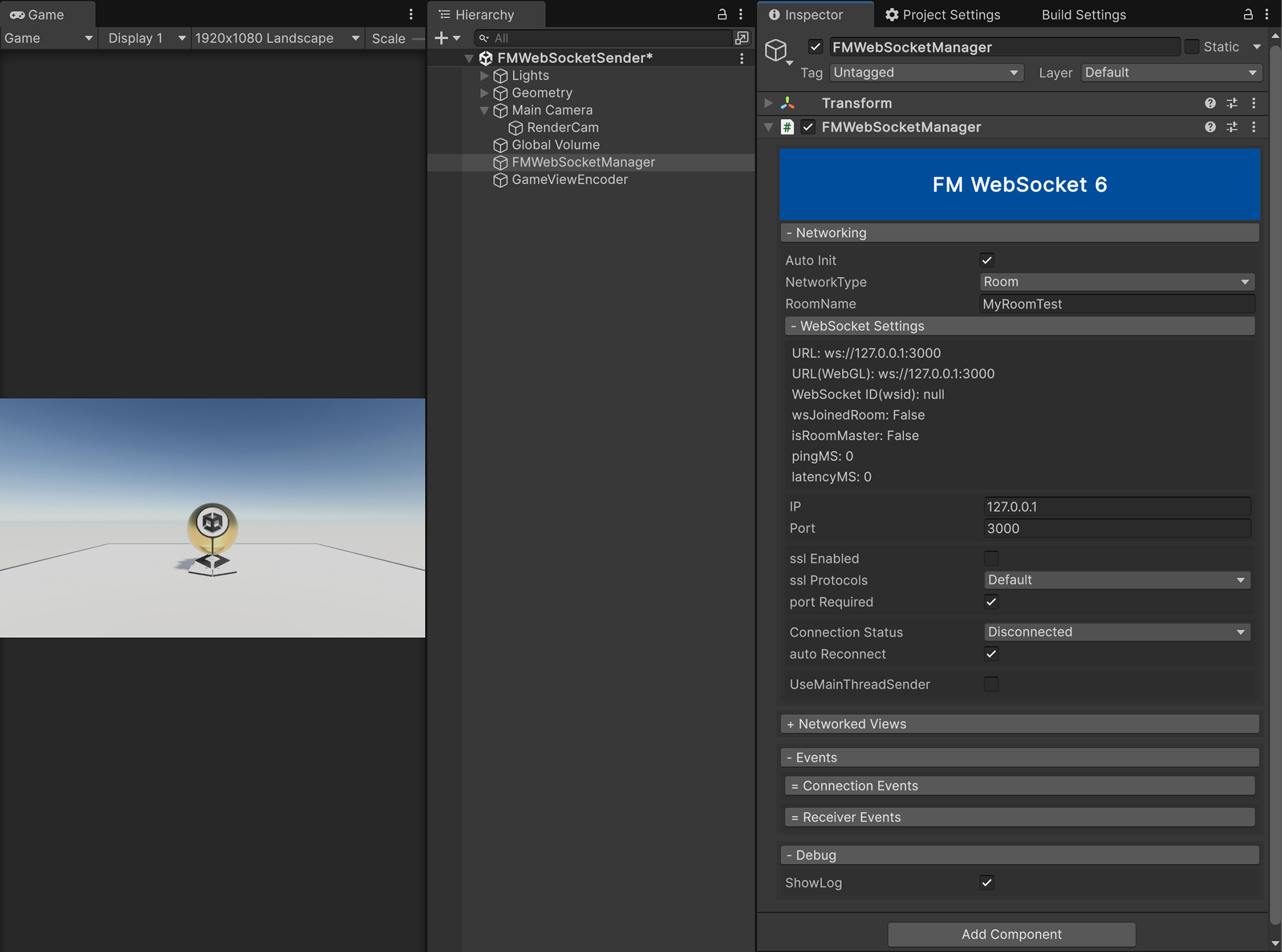
- Create a new GameObject in your scene, and name it
FMWebSocketManager. - Add Component
FMWebSocketManager.cs - Choose
NetworkType: Room - enabled
Auto Initis recommended, which will automatically start the connection in runtime. - you may also connect them manually as alternative via script.
//All node.js server examples are included in "/FMWebSocket/TestServer_v6.x.x"

//---------------- For NetworkType: Room ----------------
//Connect as "Room" network type, Create or Join Room with customised name
FMWebSocketManager.instance.Action_JoinOrCreateRoom("MyRoomTest");
//Close connection from node.js Server
FMWebSocketManager.instance.Action_Close();
//Request for Network identify "RoomMaster"
FMWebSocketManager.instance.Action_RequestRoomMaster();

//Send to all Room Clients including yourself
FMWebSocketManager.instance.SendToAll(byte[] _byteData);
FMWebSocketManager.instance.SendToAll(string _stringData);
//Send to Room Master (replaced SendToServer())
FMWebSocketManager.instance.SendToRoomMaster(byte[] _byteData);
FMWebSocketManager.instance.SendToRoomMaster(string _stringData);
//Send to Others
FMWebSocketManager.instance.SendToOthers(byte[] _byteData);
FMWebSocketManager.instance.SendToOthers(string _stringData);
//Send to Target WISD in the same room
FMWebSocketManager.instance.SendToTarget(byte[] _byteData, string _wsid);
FMWebSocketManager.instance.SendToTarget(string _stringData, string _wsid);
//Send to Backend WebSocket Server(node.js server)
FMWebSocketManager.instance.SendToWebSocketServer(byte[] _byteData);
FMWebSocketManager.instance.SendToWebSocketServer(string _stringData);
//---------------- For NetworkType: Room ----------------

//---------------- For NetworkType: WebSocket only ----------------
//Connect as "WebSocket" network type, WebSocket Mode is only for standard websocket connection
FMWebSocketManager.instance.Action_InitAsWebSocket();
FMWebSocketManager.instance.WebSocketSend(byte[] _byteData);
FMWebSocketManager.instance.WebSocketSend(string _stringData);
//---------------- For NetworkType: WebSocket only ----------------

//---------------- RPC networkView function example ----------------
// Please refer to example scene "Demo_FMWebSocketNetwork"
// 1. Instaniate the prefab(and make sure your prefab is located under Resources folder)
// 2. Make sure your prefab includes FMWebSocketView.cs component
// 3. Then, you can instaniate it after joined Room
FMWebSocketView networkView = FMWebSocketManager.instance.InstaniateNetworkObject(prefabNetworkView.gameObject.name, delegate(FMWebSocketView _callbackView) { });
// 4. You can define your own public function, and invoke it with different SendType.
// FMWebSocketSendType { All = (byte)0, RoomMaster = (byte)1, Others = (byte)2, Target = (byte)3, WebSocketServer = (byte)255 }
networkView.RPC_SEND(this, () => RPC_DebugTimestamp(Time.realtimeSinceStartup), FMWebSocketSendType.All);
public void RPC_DebugTimestamp(float inputTimestamp)
{
  Debug.Log($@"FMWebSocketView_debug -> isOwner ? {(networkView.IsOwner ? "(True)" : "(False)")} | view id: {networkView.GetViewID()} -> timestamp: {inputTimestamp}");
}